Code & data
CSV cells, image pixels and bytes: a reproducible file lab
Repeat a small KitForma experiment with downloadable CSV and image inputs, actual outputs, exact byte counts, source code and clearly stated limits.
Three everyday checks, one downloadable experiment
On 8 October 2026, we generated new synthetic files and ran KitForma’s actual CSV delimiter and image-processing engines. The purpose was narrow: can we preserve known CSV cells, distinguish fitting from cropping and stretching, and change JPEG bytes without changing pixel dimensions? This is a small first-party demonstration with inspectable evidence, not a ranking of tools or a representative benchmark.
The CSV sample contains four valid files with eight data records in total, plus one malformed file. The image sample contains one 2400 × 1600 geometric input and two 1200 × 800 compression profiles: flat shapes and seeded texture. The ZIP includes every input and output, hand-written expected cell arrays, the engine source snapshot, exact byte counts, file hashes and the script that produced them.
Download the complete lab: inputs, outputs, source and README (ZIP) ↗Measured results, runtime and SHA-256 file hashes (JSON) ↗Measured result rows (CSV) ↗
CSV: compare cell values, not just the number of lines
The four valid cases cover semicolon-to-comma conversion, comma-to-tab conversion, tab-to-semicolon conversion, and UTF-8 text with an initial byte-order mark. They include separators inside quoted values, doubled quotation marks, embedded LF and CRLF line breaks, empty cells, edge spaces and codes such as 007. Each input has a header and two data records, with three cells per record.
All four actual outputs matched their hand-written expected strings, and all 36 cells including headers matched the expected string arrays. The malformed unclosed quote was rejected. A literal replace-all comparison changed semantic cells in three of the four valid cases; it happened to preserve them in the empty-and-space case. That small comparison shows why a replacement that works on one file is insufficient evidence for a quoted file.
For the first sample, the semicolon inside “Vase; green” is part of a name. It stays a semicolon after conversion. Conversely, “Pack, carefully” needs quotation marks in comma-separated output. The code 007 stays a string in this transformation; this experiment does not test a spreadsheet’s later type inference. Import identifier columns as text when that receiving application offers the option.
Input, semicolon delimiter:
name;code;note
"Vase; green";007;"Pack, carefully"

Actual output, comma delimiter:
name,code,note
Vase; green,007,"Pack, carefully"
CSV sample: semicolon input ↗CSV sample: actual comma output ↗RFC 4180: CSV quoting and record structure ↗
Resize: the same bounds can produce different shapes
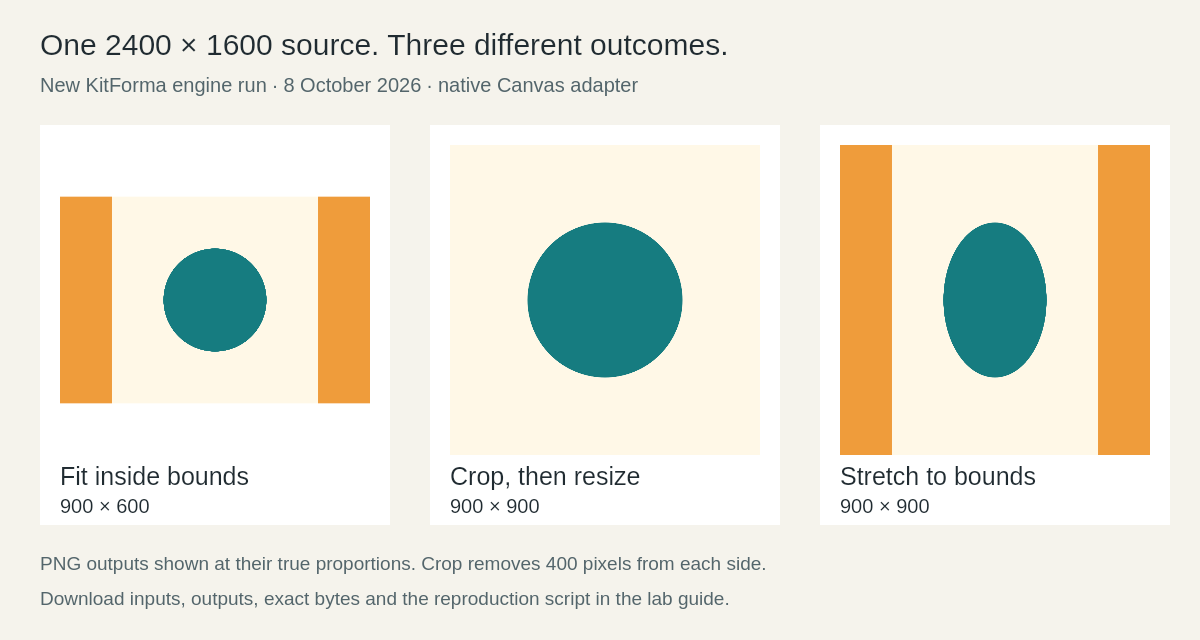
Our new source is 2400 × 1600, a 3:2 rectangle with an 800-pixel-diameter circle and 400-pixel side bands. Fitting it inside 900 × 900 with the aspect ratio preserved produced 900 × 600. The entire source remained visible. Unlocking the aspect ratio produced 900 × 900 and changed the circle into an oval.
For the square crop, we first selected the source rectangle Left 400, Top 0, Width 1600, Height 1600, then resized that crop to 900 × 900. The side bands disappeared and the circle stayed round. Cropping is a separate operation: the Resize tool alone does not automatically crop or pad a fitted image.
We decoded the saved PNGs to verify dimensions and measured the bounding box of exact teal pixels. Fit measured 298 × 298, crop 448 × 448 and stretch 300 × 448. Antialiased edge pixels are excluded, so these are interior-color measurements, not the mathematical diameter. The script permits a two-pixel difference from the geometric expectation.
Operation             Decoded output     Saved bytes
Fit, ratio preserved  900 × 600           10,372
Crop, then resize     900 × 900           16,612
Stretch, unlocked     900 × 900           14,297
Resize input: new 2400 × 1600 geometry PNG ↗Resize output: fit, 900 × 600 PNG ↗Resize output: crop then resize, 900 × 900 PNG ↗Resize output: stretch, 900 × 900 PNG ↗MDN: drawImage source rectangles and scaling ↗
Compression: identical dimensions do not imply identical file size
We independently encoded each 1200 × 800 PNG as JPEG at quality 40, 60, 80 and 95. No target-size setting was used and no resize was requested. All eight saved JPEGs decoded to 1200 × 800. Quality here is the encoder input, not a measured percentage of visual fidelity.
The flat-shape PNG was 15,877 bytes. At quality 95 its JPEG was 18,334 bytes: 15.48% larger than that PNG. At quality 80 it was 13,209 bytes. The textured PNG was 1,506,669 bytes; its JPEG outputs ranged from 92,894 to 515,771 bytes. These two deliberately different specimens demonstrate why format and quality settings alone cannot predict another image’s savings.
Suppose a destination required strictly fewer than 100,000 bytes while retaining 1200 × 800 pixels. Among the four tested texture outputs, only quality 40 met both numeric conditions. That is an illustrative threshold, not a real website policy, and we did not search for the highest quality that would fit. We also did not score visual quality: open the full-size texture and JPEGs to inspect the fine black-and-white edges before choosing an output.
Quality    Flat shapes JPEG    Textured JPEG
40         10,185 bytes         92,894 bytes
60         11,158 bytes        148,323 bytes
80         13,209 bytes        267,600 bytes
95         18,334 bytes        515,771 bytes

PNG inputs: flat 15,877 bytes; texture 1,506,669 bytes.
All inputs and outputs above: 1200 × 800 pixels.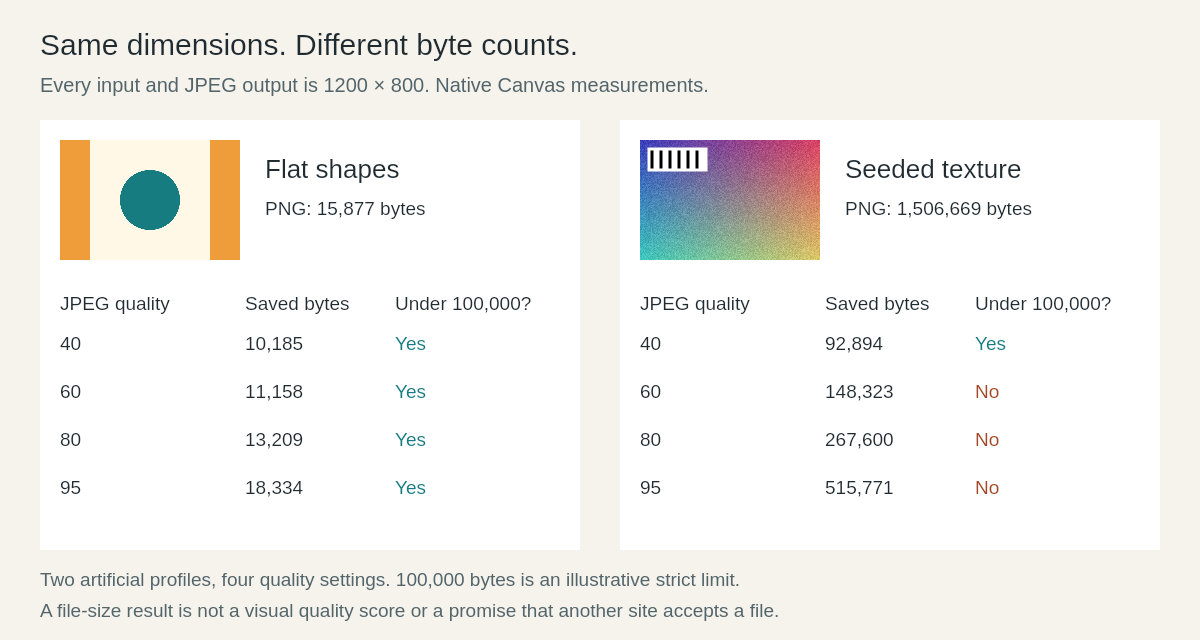
Compression input: flat shapes PNG ↗Compression output: flat shapes, JPEG quality 95 ↗Compression input: seeded texture PNG ↗Compression output: texture, JPEG quality 40 ↗Compression output: texture, JPEG quality 80 ↗MDN: Canvas export formats and quality ↗
Repeat the measurements or try the files in the tools
To reproduce the engine experiment, download the ZIP, extract it into an empty directory and install Node.js 24 or newer. Run the commands below from that directory. npm install downloads the single declared dependency, @napi-rs/canvas 1.0.9. The experiment then generates its files locally without uploading data or calling a service. Results go into a new rerun folder; the published files remain available for comparison.
The published run used Node.js v24.19.0 on Windows x64, @napi-rs/canvas 1.0.9 and an esbuild 0.28.1 snapshot of the production engines. Source-file SHA-256 hashes are in engine-sources.json. The native Canvas adapter supplies decoding, drawing and encoding for the real processImage function. It does not exercise the browser UI, and its codec is not evidence of the exact bytes Chrome, Safari or another browser will produce.
For a practical check in KitForma, open the CSV delimiter converter with the semicolon input, Resize with the geometry PNG, or Compress with either 1200 × 800 PNG. Choose the stated settings and download your actual result. Compare cell values, decoded dimensions and bytes separately. If your browser gives a different byte count, record its result instead of copying this table.
npm install
node run-lab.mjs

Inspect: rerun/results.json
Compare: rerun/results.csv
Download the complete lab: inputs, outputs, source and README (ZIP) ↗Read the methodology and reproduction commands ↗Inspect the reproducible experiment script ↗
Use the result within the limits of the sample
Four tiny valid CSV files and one rejected input cannot establish support for every CSV dialect, encoding, spreadsheet or large-file workload. Two artificial image profiles cannot stand in for photographs, screenshots, transparent artwork or a production image collection. We did not test EXIF orientation, animation, HEIC, color management, accessibility, OCR, upload acceptance or processing speed.
The useful result is a repeatable decision process. After a CSV change, compare semantic cells and identifier strings. After resizing, verify the saved width and height and inspect the subject’s shape. After compression, verify the allowed format, exact bytes, dimensions and visible detail. Preserve the original, and use the receiving application’s actual requirements to decide whether your file is ready.
KITFORMA
Put it into practice
Reading guides is free and needs no account. Linked tools explain any account or Pro requirements.
Further reading
Sources last reviewed:
KitForma prepared this guide with AI assistance. Examples illustrate a workflow; they are not measurements of real sales, search volume or success. Check the linked sources and the result with your own file.
- Download the complete lab: inputs, outputs, source and README (ZIP)
- Measured results, runtime and SHA-256 file hashes (JSON)
- Measured result rows (CSV)
- Read the methodology and reproduction commands
- Inspect the reproducible experiment script
- CSV sample: semicolon input
- CSV sample: actual comma output
- Resize input: new 2400 × 1600 geometry PNG
- Resize output: fit, 900 × 600 PNG
- Resize output: crop then resize, 900 × 900 PNG
- Resize output: stretch, 900 × 900 PNG
- Compression input: flat shapes PNG
- Compression input: seeded texture PNG
- Compression output: flat shapes, JPEG quality 95
- Compression output: texture, JPEG quality 40
- Compression output: texture, JPEG quality 80
- RFC 4180: CSV quoting and record structure
- MDN: Canvas export formats and quality
- MDN: drawImage source rectangles and scaling
How to use this guide
Published and maintained by KitForma. The linked references explain the relevant formats and definitions. Examples use sample inputs; they do not establish a speed, quality or compatibility guarantee for your files. Check the tool’s stated limits and inspect your downloaded result.
Questions & experiences
Share what worked, ask a specific question, or suggest a correction. Never include passwords, private files or personal document details.
Loading community…