PDF guides
Prepare Etsy digital downloads: file sizes, ZIPs and a buyer-ready package
Plan a digital product around Etsy’s attachment limits, reduce oversized PDFs carefully, and test the exact files your buyer will receive.
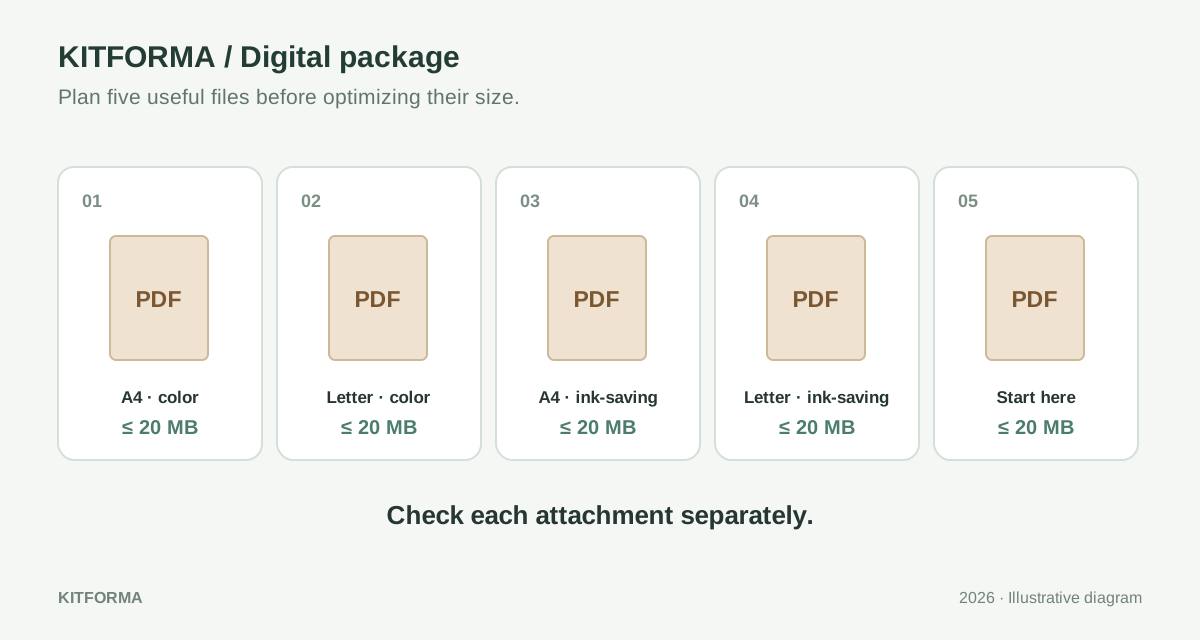
Start with a five-slot delivery plan
Etsy’s instant-download listing accepts up to five files, with a maximum of 20 MB per file. Treat those as separate attachment limits: one oversized file is not rescued by having four tiny companions. PDF, JPG, PNG and ZIP are among the supported formats. Confirm the current help page before preparing a new product.
For a printable weekly planner, write down what a purchaser actually needs: one A4 PDF, one US Letter PDF, an ink-saving version of each, and a short instruction sheet. That is a complete five-file package without an archive. A different product might work better as one ZIP of illustrations plus a readable guide. Choose the structure around use, rather than filling every available slot.
Make a staging folder for only the files you intend to sell. Keep source artwork, earlier drafts, listing mockups and editable working files elsewhere. This simple separation prevents a late export from accidentally adding a preview watermark to the paid download or including a version whose margins have not been checked.
Measure saved files instead of guessing from pages
A two-page PDF containing large photographs can outweigh a fifty-page text booklet. Check the saved byte size of every proposed attachment and record it in your staging list. Leave a comfortable margin below the destination limit rather than aiming for a rounded value displayed as exactly 20 MB. Applications do not always display decimal and binary units consistently.
For an illustrative package, imagine the A4 planner is 6.2 MB, the Letter version 6.5 MB and the guide 0.4 MB. Those are invented planning figures, not KitForma compression results. If the next export produces a 23 MB illustration pack, inspect what made it large before reducing all the other files. Optimizing unrelated attachments will not change that pack.
Delivery manifest — example only
planner-a4-color-v1.pdf       → size checked, 12 pages
planner-letter-color-v1.pdf   → size checked, 12 pages
planner-a4-ink-v1.pdf         → size checked, 12 pages
planner-letter-ink-v1.pdf     → size checked, 12 pages
start-here-v1.pdf             → size checked, 2 pages
Reduce the oversized asset without changing the product
First return to the authoring file when possible. Remove unused full-resolution mockups, duplicated background images and pages that were never part of the promised product. Do not remove instructions, page sizes or printable designs simply to meet a number. If a bundle becomes too large, a deliberate reorganization is easier for the buyer than a set of arbitrary fragments.
KitForma’s PDF compression tool offers structural optimization and a separate image-compression approach. Try structural optimization first when selectable text and sharp vector lines matter. Savings vary, and an already efficient PDF may barely shrink. Image compression renders pages and can sacrifice selectable text and fine detail; it is a poor default for small type, cut lines or artwork intended for close viewing.
After any reduction, inspect a dense page, a pale page and the smallest text at the intended print size. Compare against the original. A successful download only establishes that a file was created, not that its visual quality still matches your listing. Keep the uncompressed master so a smaller export can be replaced without reconstructing the design.
- Identify the attachment that exceeds the limit.
- Try a source export or structural optimization and measure the saved copy.
- Inspect text, line work and page dimensions before accepting it.
- If quality is unacceptable, redesign the package rather than repeatedly recompressing it.
Use a ZIP for organization, not a promised size reduction
A ZIP can group related files into one attachment, but compressed JPGs and many PDFs may not become much smaller. Measure the finished archive itself. KitForma’s PDF Split can create a ZIP of page groups; that does not make it a general archive manager for every kind of product. Use your operating system’s archive tools when combining a mixture of image files and instructions.
Give folders a short, predictable structure. For example, an illustration set can have PNG files in one folder and a guide beside them. Avoid putting several nearly identical archives inside another archive. Open the ZIP from a fresh download folder and extract it before checking the files. Testing only the original folder skips the delivery step most likely to reveal a missing asset.
botanical-set-v1.zip
  png/
    fern-01.png
    fern-02.png
  start-here.pdf

Keep source files and listing previews outside this archive.
Make the file list understandable without your help
Etsy shows the uploaded file names to buyers, so settle the names before attachment. Use a short product name, paper size or ratio, color version and revision. A name such as planner-a4-ink-v1.pdf communicates more than final-final-3.pdf. Keep the description consistent with the package: if the listing promises two paper sizes, both must be easy to identify.
Put a brief file map in the guide, followed by the minimum steps needed to open or print the product. Etsy currently directs digital purchases to a browser or computer for downloading rather than the Etsy app. Link buyers to Etsy’s own download instructions so your guide does not depend on remembering every interface label.
Etsy Help: digital listing attachments and file names ↗Etsy Help: downloading purchased digital items ↗
Perform one final buyer-style test
Open every final attachment after downloading or copying it into an empty folder. Count the files and pages, check the orientation, and verify that preview graphics have not been substituted for paid artwork. For a printable item, make a sample print of at least one demanding page using the settings described in your guide. Record which exported version you checked.
KitForma’s linked PDF and image operations process supported files in the browser; they do not attach files to Etsy or certify a listing. The site still needs to load, and your device needs enough memory. Save the finished files before closing the tab, then review Etsy’s attachment list and listing description as a separate final step.
- Check each attachment’s saved size and extension.
- Extract every archive and open its contents.
- Verify promised paper sizes, versions and page counts.
- Match names and contents to the buyer-facing description.
- Keep the master and a copy of the exact delivered package.
KITFORMA
Put it into practice
No account needed. Open an article, then try the matching tool.
Further reading
Sources last reviewed:
How to use this guide
Published by KitForma, maintained by Fatih Erkan. The linked references explain the relevant formats and definitions. Examples use sample inputs; they do not establish a speed, quality or compatibility guarantee for your files. Check the tool’s stated limits and inspect your downloaded result.
Questions & experiences
Share what worked, ask a specific question, or suggest a correction. Never include passwords, private files or personal document details.
Loading community…